▶ Watch this video on YouTube (opens in a new tab)
Back in 2025, I made a fifteen-video series on running Scrum with GitHub Projects. While I was recording it, I kept a little wish list of things that were bugging me and that I hoped GitHub would fix. It's been about a year. GitHub has shipped a lot. Time for an update.
TL;DR
- Task breakdown: delivered. Sub-issues plus the new hierarchy view make sprint planning a lot smoother.
- Shared fields: delivered. Issue fields are defined at the org level, and the value lives on the issue itself.
- Dependencies: delivered, plus a bonus. "Blocked by" shipped, and "relates to" came along with it.
- Forecasting: not yet. "When will it be done?" still isn't something the product answers for you.
- Surprise bonus: coding agents now show up right on your issues and your project boards.
My 2025 Wish List
Here's what I was hoping for when I recorded the original series:
- Task breakdown. When I was splitting user stories into tasks during sprint planning, sub-issues were a little awkward to work with.
- Shared fields. Things like priority and estimate lived inside one project. If an issue was in two projects, it basically had two sets of values.
- Dependencies. I wanted a clean way to say "this item is waiting on that item" so the whole team can see what's blocking what.
- Forecasting. The built-in charts are mostly about status counts. What your stakeholders actually want to know is when will it be done?
The good news is that most of these are done now. Let's go through what GitHub delivered, and I'll keep score as we go.
A Year of Releases, Fast
Here's the short version. If you want a cheat sheet, this is it.
| When | What shipped | Status |
|---|---|---|
| Aug 2025 | Issue dependencies (blocked by) | Shipped |
| Mar 2026 | Hierarchy view in Projects | GA |
| Mar 2026 | Agent sessions in Issues and Projects | GA |
| May 2026 | Created, Updated, Closed fields | Shipped |
| Jul 2026 | Issue fields | GA |
| Jul 2026 | Advanced search in project views | GA |
| Sep 2026 | Relates to relationship | GA |
Issue dependencies landed back in August 2025, which checked off a wish list item right away. March was a big month, with hierarchy view going GA and coding agents showing up on your issues and boards. And the summer brought issue fields, a much better filter bar, and a new way to connect related issues.
Wish #1: Sub-Issues Are Excellent Now
This is the one I'm happiest about.
When I was doing the sprint planning and task planning demos in the original videos, sub-issues were brand new and a little awkward. I actually had to build an extra view just to keep track of my tasks. Sub-issues have improved a ton since then, and honestly, they're excellent now.
The big reason they feel so much better is a feature called hierarchy view.
The setup from my sprint planning videos is pretty normal stuff: one user story broken into tasks using sub-issues. With hierarchy view, those tasks show up nested under their parent right there in your project table view, and you can still group, sort, and filter.
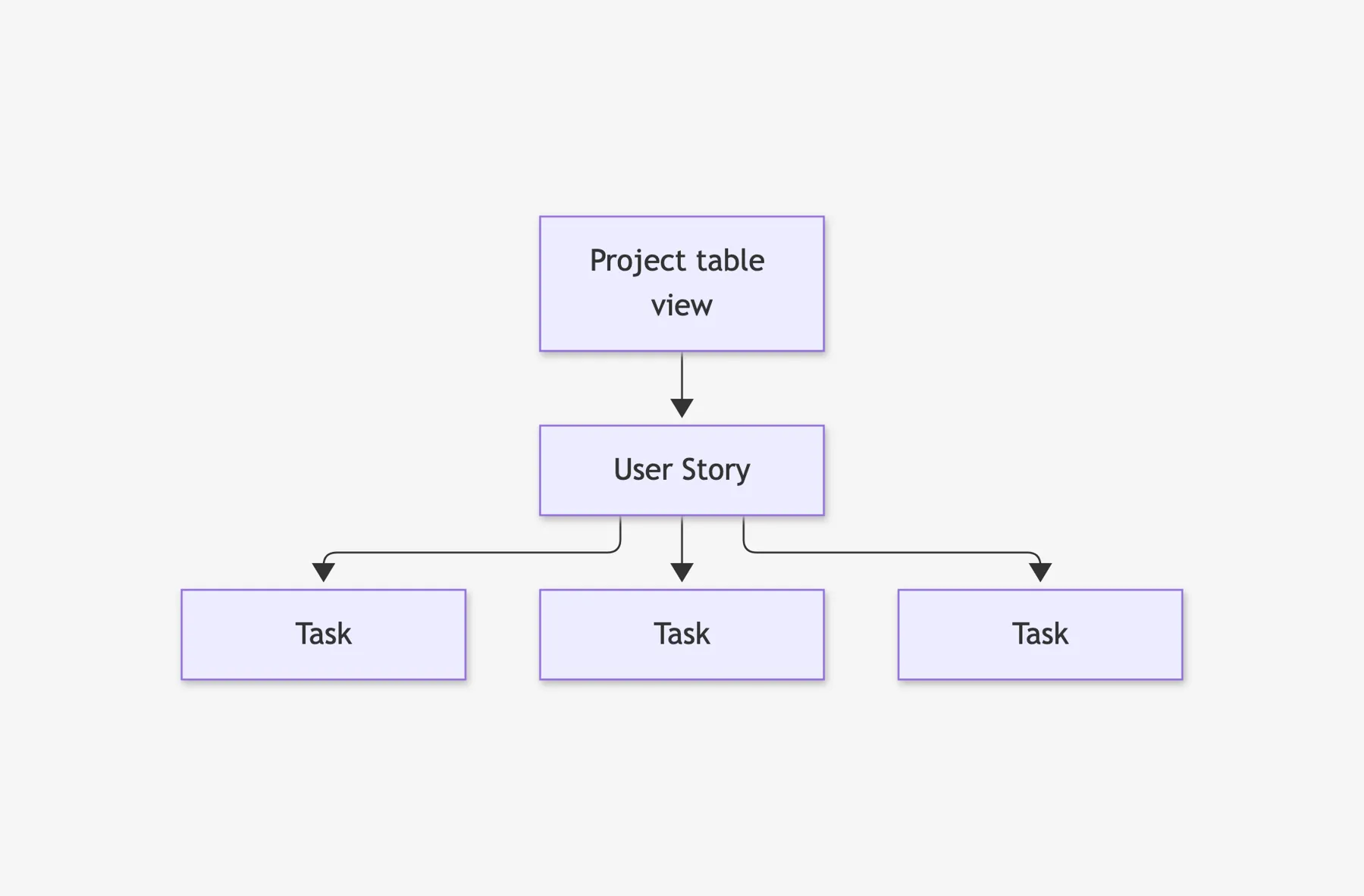
It goes up to eight levels deep. It's on by default for new views. For your existing views, flip on Show hierarchy from the View menu.
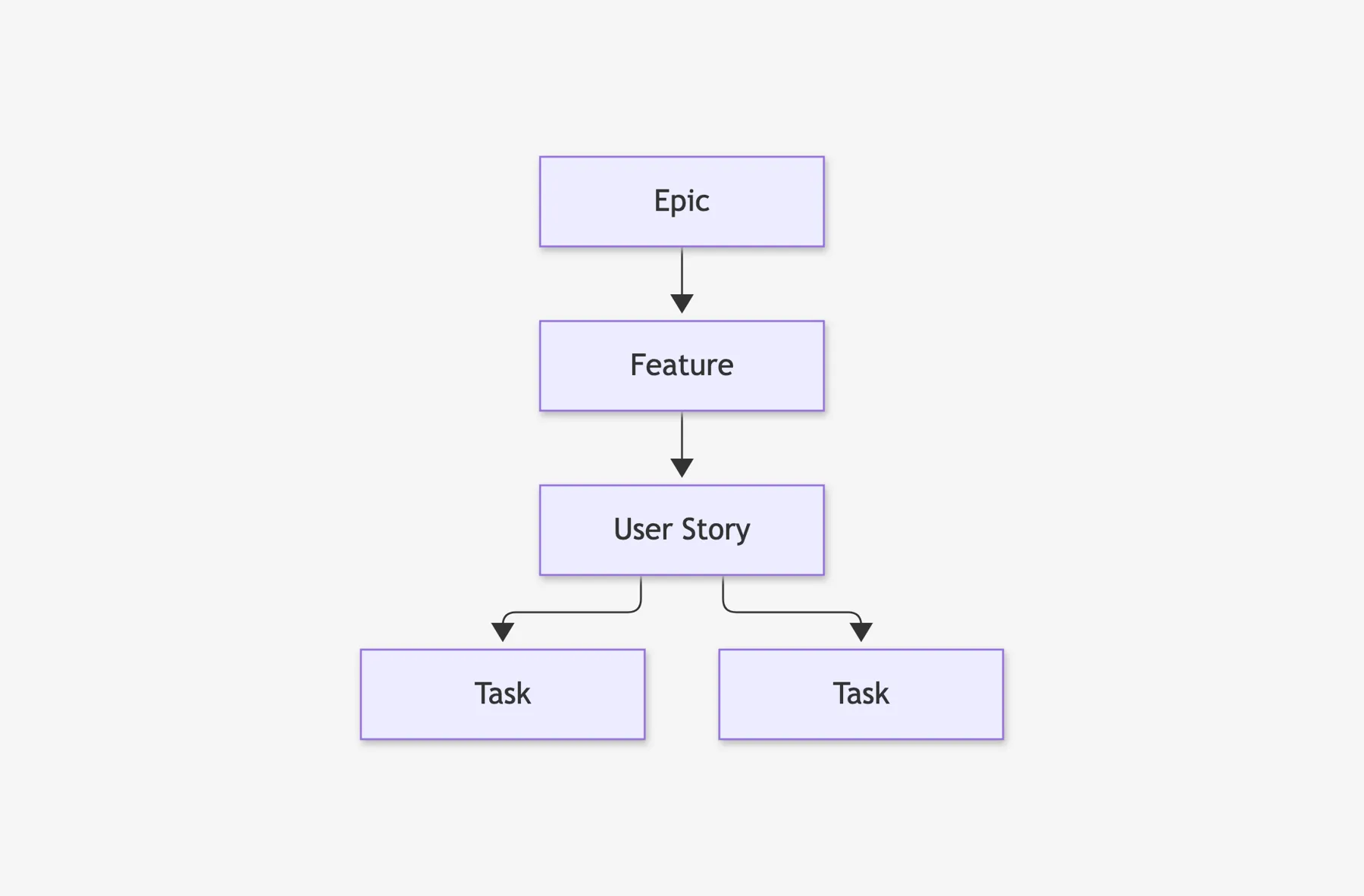
And when you add sub-issues to a filtered view, GitHub now applies that same filter to them. So your tasks show up right alongside their stories in your sprint view. That's the thing that used to require my extra view.
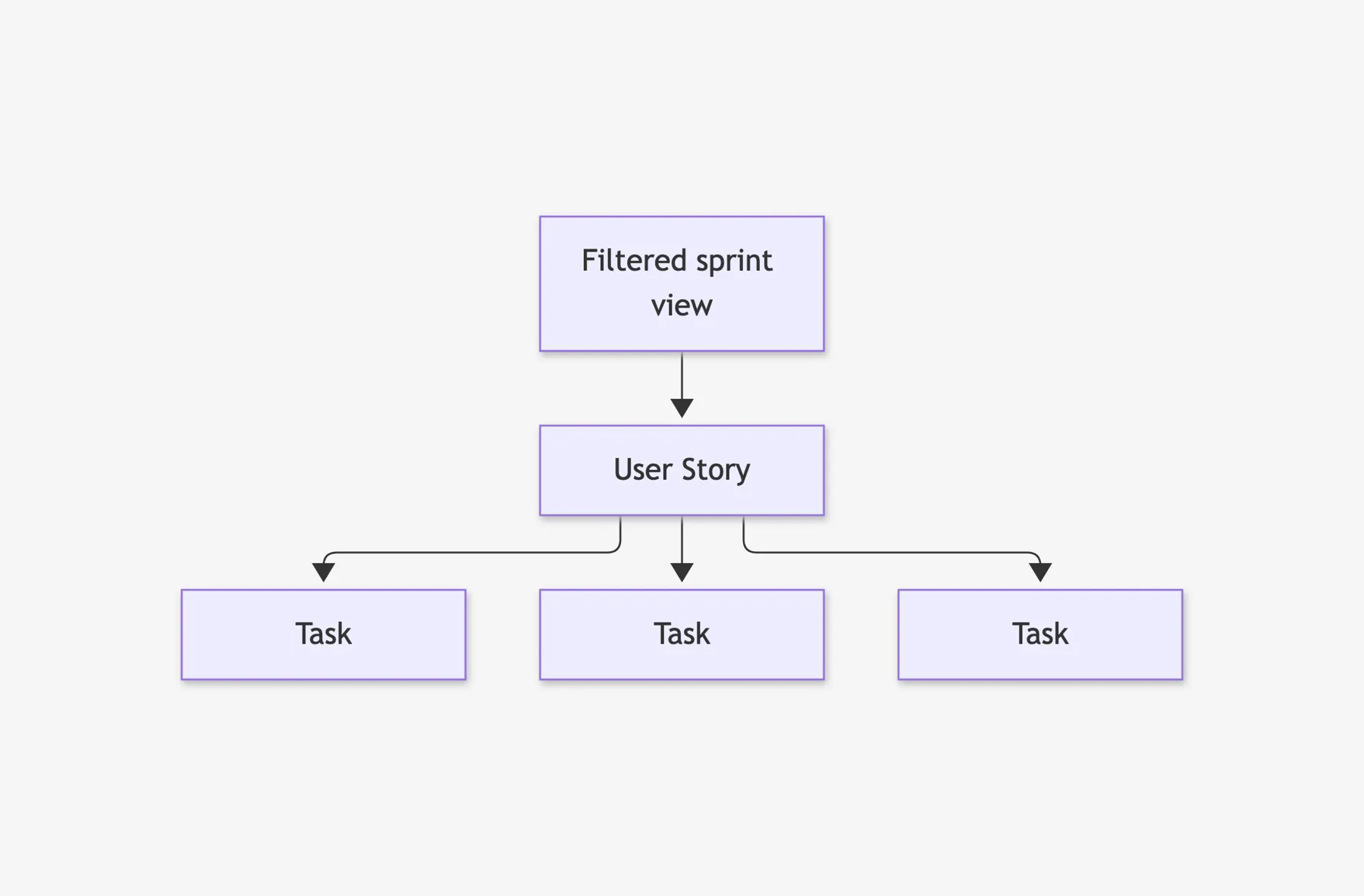
Quick opinion, though: just because you can nest eight levels doesn't mean you should. Two levels is plenty for most teams.
Wish #1: delivered.
Wish #2: Project Fields vs. Issue Fields
This is the change I think people will have the most questions about, so let's compare.
Project fields are the ones you've been using all along.
- They're defined inside a single project. That's where the Estimate and Size columns from my original series came from.
- The values live in that project, too. If the same issue is in two projects, it's got two separate sets of values.
- They're still really useful for stuff that only matters to one project, like an iteration or a planning status.
Issue fields are new.
- They're defined once, at the organization level, and they show up on every issue in every repository.
- The value lives on the issue itself. Set the priority once and it's the same everywhere that issue shows up.
- You can pin fields to specific issue types. Maybe Effort only shows up on user stories and not on bugs.
Put another way: project fields describe how one project uses an issue. Issue fields describe the issue itself.
Issue Fields: The Details
Issue fields went GA in July. A few practical details:
- Four defaults out of the box. Every organization gets Priority, Effort, Start date, and Target date.
- Add your own. Single select, text, number, and date types. Multi-select went GA in August.
- Where to find them. Organization settings → Planning → Issue fields. It's an org admin thing, so you might need to go find that person.
- Migration help. GitHub published a Copilot skill that bulk copies values from labels or project fields into issue fields. That's pretty handy if you've got years of priority labels.
Now, I know you're going to ask: should I delete my old Estimate project field? I wouldn't rush it. Run them side by side for a sprint or two and see which one your team actually keeps up to date.
Wish #2: delivered.
Wish #3: Three Ways Issues Connect
GitHub actually went a step further than I asked for here. There are now three kinds of connections between issues:
- Parent and child using sub-issues. That's what we just talked about.
- Blocked by using issue dependencies. You can mark an issue as blocked by another issue (or as blocking one), and everybody can see it.
- Relates to, which went GA in September. It just says these two issues are connected, without saying that one blocks or contains the other.
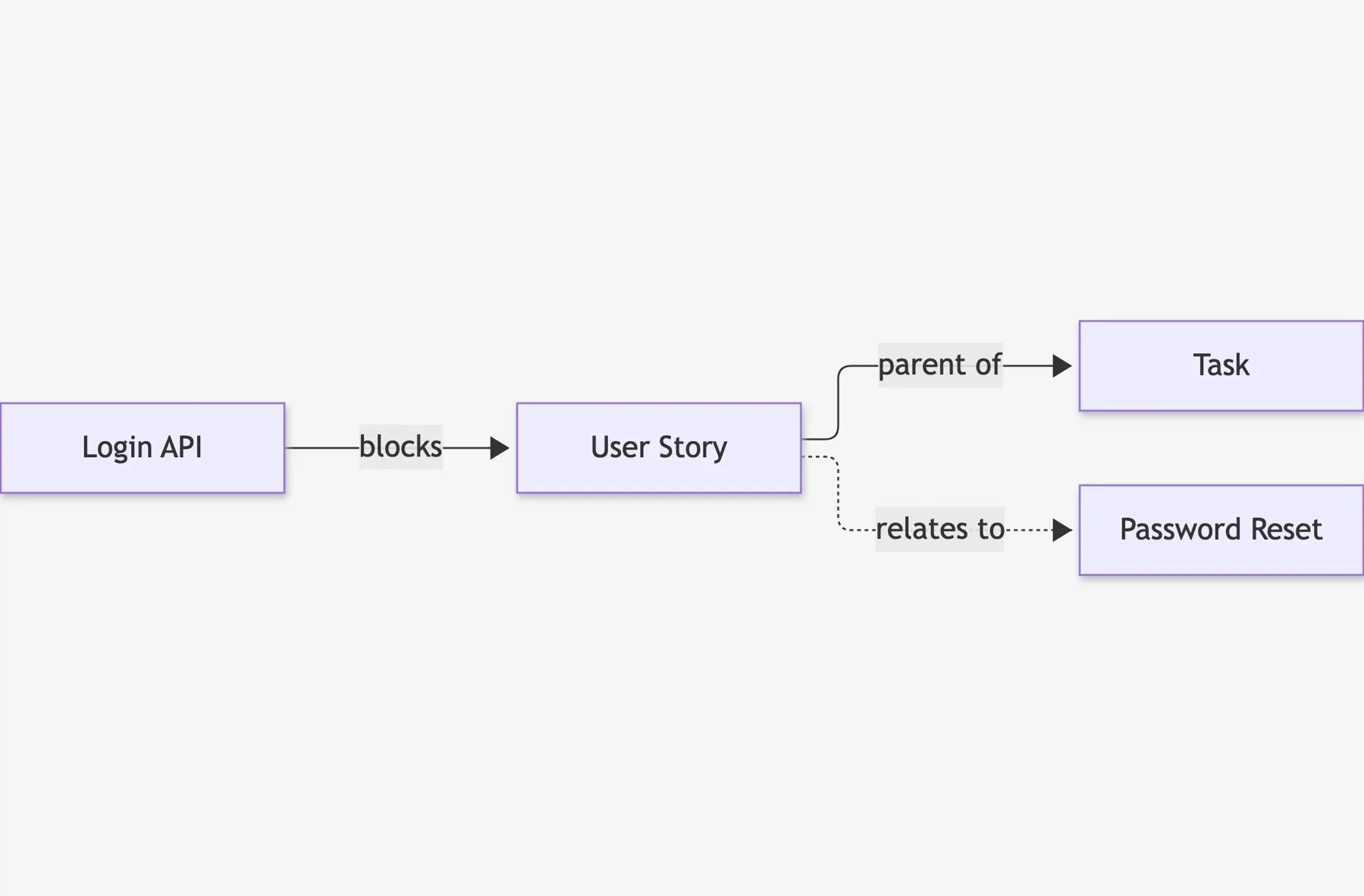
Quick scope fence: these are relationships, not a scheduling tool. Don't expect a Gantt chart. But for keeping your team on the same page about what's waiting on what, this does the job.
Wish #3: delivered.
Bonus: Finding Your Stuff Got Easier
A bunch of changes that are basically about finding things faster:
- AND and OR in project view filters. The project filter bar now supports advanced search, which means you can stop making a separate view for every single question you've got.
- Saved views for repository issues. Pin them to the sidebar or keep them private, just for you.
- Smarter issue search. Search got smarter about meaning, so you don't have to guess the exact words somebody used in the title.
- Duplicate issue detection (preview). If you've ever had three people file the same bug on the same Monday, you're going to appreciate this.
Bonus: There Are Robots on Your Board
This one wasn't on my wish list at all, because in 2025 I didn't even imagine it.
- Assign an issue to a coding agent like Copilot, Claude, or Codex. Its session shows up right under the assignees on that issue.
- Live status. You can see if the agent is queued, working, waiting for review, or completed.
- Show agent sessions on your board. Turn on Show agent sessions in your project views and you can see which items have an agent working on them.
- Auto-assign Copilot from issue templates. Add Copilot as an assignee in an issue template and certain kinds of issues go straight to the agent.
Should a robot really be picking work off your backlog? Here's my take: a clear, well-written issue is what makes an agent successful. The better your issues are, the better this works. (That's a whole future video.)
Rapid Fire: Smaller Wins
I'm not going to go deep on these. I just want you to know they exist.
- Move unfinished items to the next iteration in bulk. Really handy at the end of a sprint.
- Default values for project fields. New items show up with a status right away.
- Import project items with a search query instead of adding them one at a time.
- File uploads in issue forms. Great for screenshots on bug reports.
- New onboarding: set a default repository for new issues. That's basically my old advice about a dedicated project issues repo, built right in.
What About "When Will It Be Done?"
So that's three out of four wishes delivered, which is honestly a fantastic year for GitHub Projects. That brings us to the last item on my list — the question every stakeholder eventually asks you: when will it be done?
Here's where things stand. Two things still aren't really in the product:
- Forecasting delivery. The new Created, Updated, and Closed timestamp fields are a nice step, but they're not a forecast.
- QA testing and test case management. There's no built-in way to manage test cases and test runs — nothing like what Azure DevOps teams have with Test Plans.
And I want to give GitHub some credit here, because I totally get why. These are really hard to solve generically, especially forecasting. Every team defines "started" and "done" a little differently. Every team splits work a little differently. And a forecast that's wrong is worse than no forecast at all. An answer that fits every team is really tough to build.
Shameless Plug: Honest Cheetah
That's exactly why I built Honest Cheetah. It's got the tools to answer questions like "when will it be done?", AI-assisted project management and project coaching, QA testing tools, and the ability to import your work items and test cases from Azure DevOps. Please consider giving it a try.
The 2026 Wish List Scorecard
- ✅ Task breakdown: delivered. Sub-issues with hierarchy view make sprint planning so much smoother.
- ✅ Shared fields: delivered. Issue fields at the organization level.
- ✅ Dependencies: delivered, with "relates to" thrown in as a bonus.
- ⏳ Forecasting and QA testing: not in the product yet. For AI-assisted project management, forecasting, QA testing, and importing from Azure DevOps, check out Honest Cheetah.
That's the GitHub Projects & Issues update for Q4 2026. If you want the full walkthrough, watch the video on YouTube — and if you're feeling wildly generous, click "like" and "subscribe."