
This is Chapter 14 of Azure Cosmos DB for .NET Developers. Previous: Chapter 13: Making the Case — Loss Aversion, Tradeoffs, and the Right Tool for the Job.
In the last chapter, we built a framework for thinking about architectural tradeoffs — the Acute/Chronic Tradeoff Test. We named the acute pain (Cosmos DB isn't good at reporting), named the chronic cost of retreating to relational (impedance mismatch, scalability complexity, operational burden that compounds forever), and asked whether a targeted solution exists that solves the acute pain without adopting the chronic cost.
This chapter is Step 3: the targeted solution.
Microsoft Fabric with Cosmos DB mirroring gives you the set-operations-living-next-to-the-data experience on top of your Cosmos data, without maintaining a separate relational database and without building an ETL pipeline. Let me show you what that looks like.
Enter Microsoft Fabric
Here's what Fabric mirroring does, in plain language rather than marketing language: it creates a copy of your data in a format optimized for reporting. Cosmos does what Cosmos is good at and then -- over here and separated -- you get a copy of your data that you can use for reporting using T-SQL.
Sounds great, right? Use the right tool(s) for the job(s). So how's it work?
Fabric mirroring continuously replicates your Cosmos DB data into something called OneLake — Microsoft's unified data lake. Your JSON documents get converted to Delta Lake tables in Parquet format, which is a columnar, analytics-optimized format. The replication happens in near real-time. And here's the critical part: it doesn't consume Request Units on your Cosmos DB account.
Why doesn't this use your Cosmos DB RUs? How does that magic trick pulled off? We haven't discussed backup and restore options for Cosmos DB yet but there's an option called continuous backup. The Fabric replication process rides on top of Cosmos DB's continuous backup feature as its source. So continuous backup writes the changes to something external to the live Cosmos container(s) and then Fabric replication uses that separated, inert copy of the data for replication. That way, there's zero impact on the transactional workloads.
Once your data is mirrored into OneLake, Fabric gives you a SQL analytics endpoint. From this point, it starts looking quite a bit like SQL Server queries. Each Cosmos container shows up as a table — and you can query it with T-SQL. (Actual, real T-SQL.) GROUP BY, JOIN, aggregate functions, window functions — all the set-based operations that Cosmos can't do or does awkwardly. The operations run in Fabric's compute, not Cosmos's, so you don't burn RUs.
What this means architecturally: your operational data stays in Cosmos, stored as trees, optimized for transactional document operations. Fabric automatically maintains an analytical copy, stored as tables, optimized for set-based operations. Two copies of the data, each in the format that suits its purpose. No code to write. No ETL pipeline to maintain. No sync jobs to monitor at 2 AM.
This is the "right tool for the job" principle in action. Your Cosmos app keeps all its architectural advantages — no impedance mismatch, no DTOs, no adapters, domain objects stored as-is. And your reporting needs get met by a purpose-built analytical engine. Both tools doing what they're good at. Neither being asked to do what they're not particularly great at.
Let me show you what this looks like with the cocktail app.
Setting Up the Demo: Mirroring the Cocktail App
Here's what you need to get started.
Prerequisites
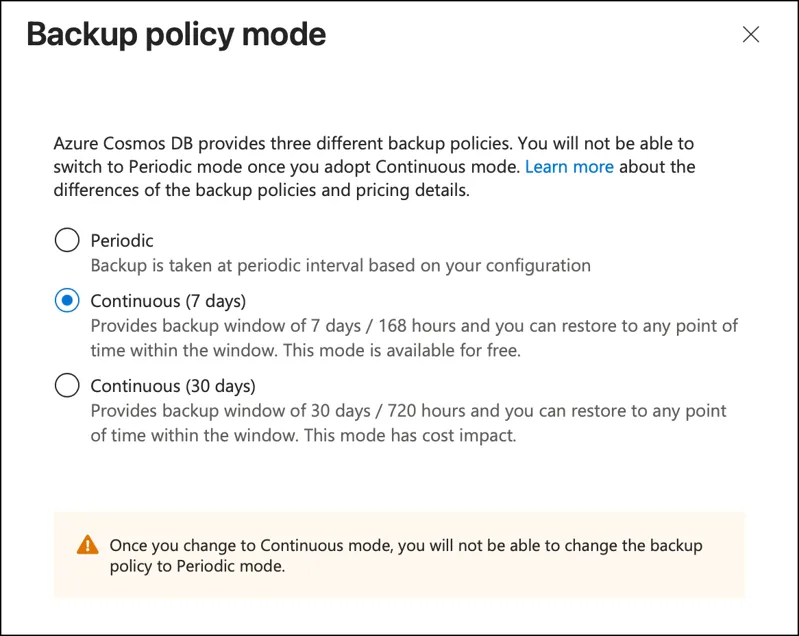
Cosmos DB continuous backup. Continuous backup is a prerequisite for mirroring because it's how Fabric taps into the change stream. If you don't already have it enabled, you'll need to migrate your account to continuous backup mode. Fair warning: enabling continuous backup is irreversible — once it's on, you can't turn it off. The good news is that the 7-day retention tier is free, so there's no cost impact.
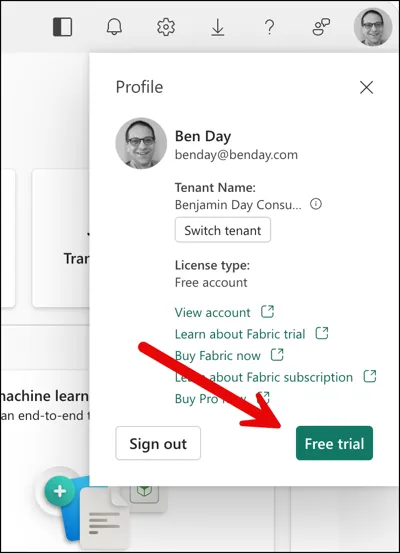
A Microsoft Fabric trial. This is free for 60 days. No credit card required beyond whatever Azure account you already have. Go to app.fabric.microsoft.com, sign in with your Microsoft account, and activate the trial. It takes about two minutes. With the current version of the UI, the free trial signup is a little bit hidden. Click on your profile picture in the upper right of the screen and then you'll see your Profile card. The "free trial" button should be visible in the bottom right.
Public network access on your Cosmos DB account. At least for the initial setup. If you're using private endpoints in production, Fabric does support that (it went GA in March 2026), but the setup is more involved and this isn't a networking chapter. Keep it simple for now.
Create a Fabric Workspace
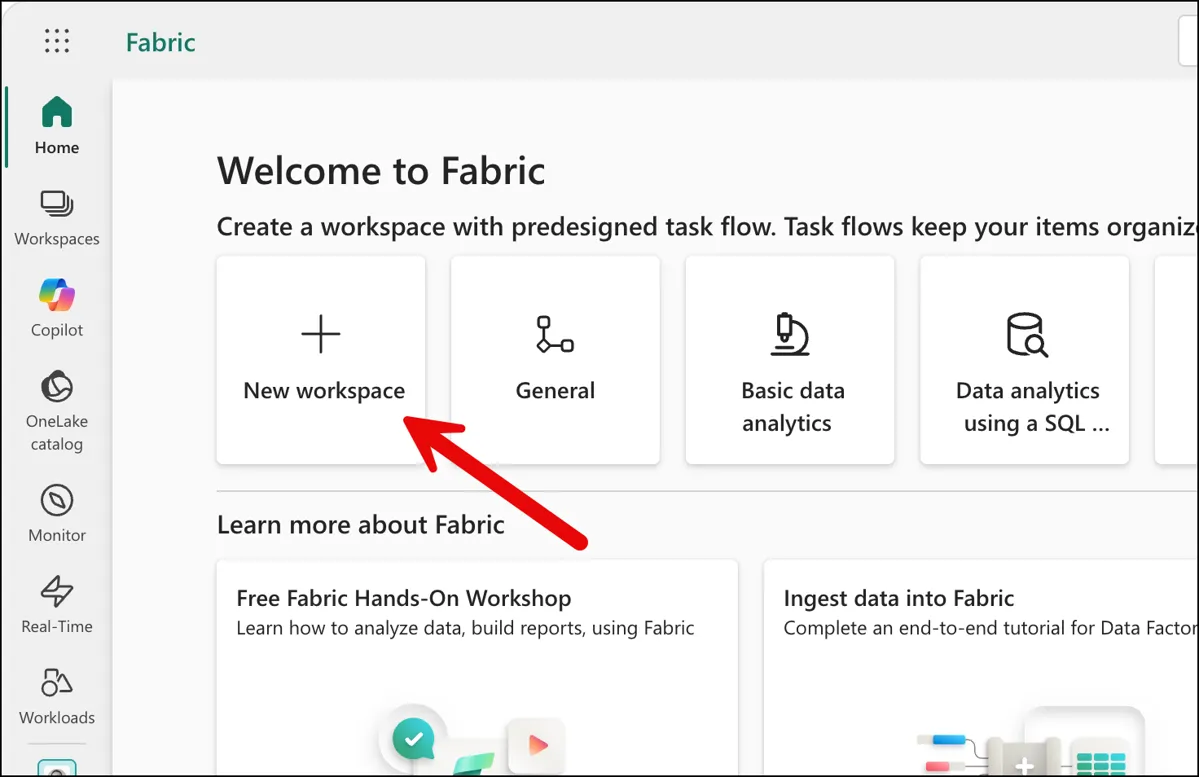
From the Fabric portal page, you'll need to create a workspace. Click on the New workspace button.
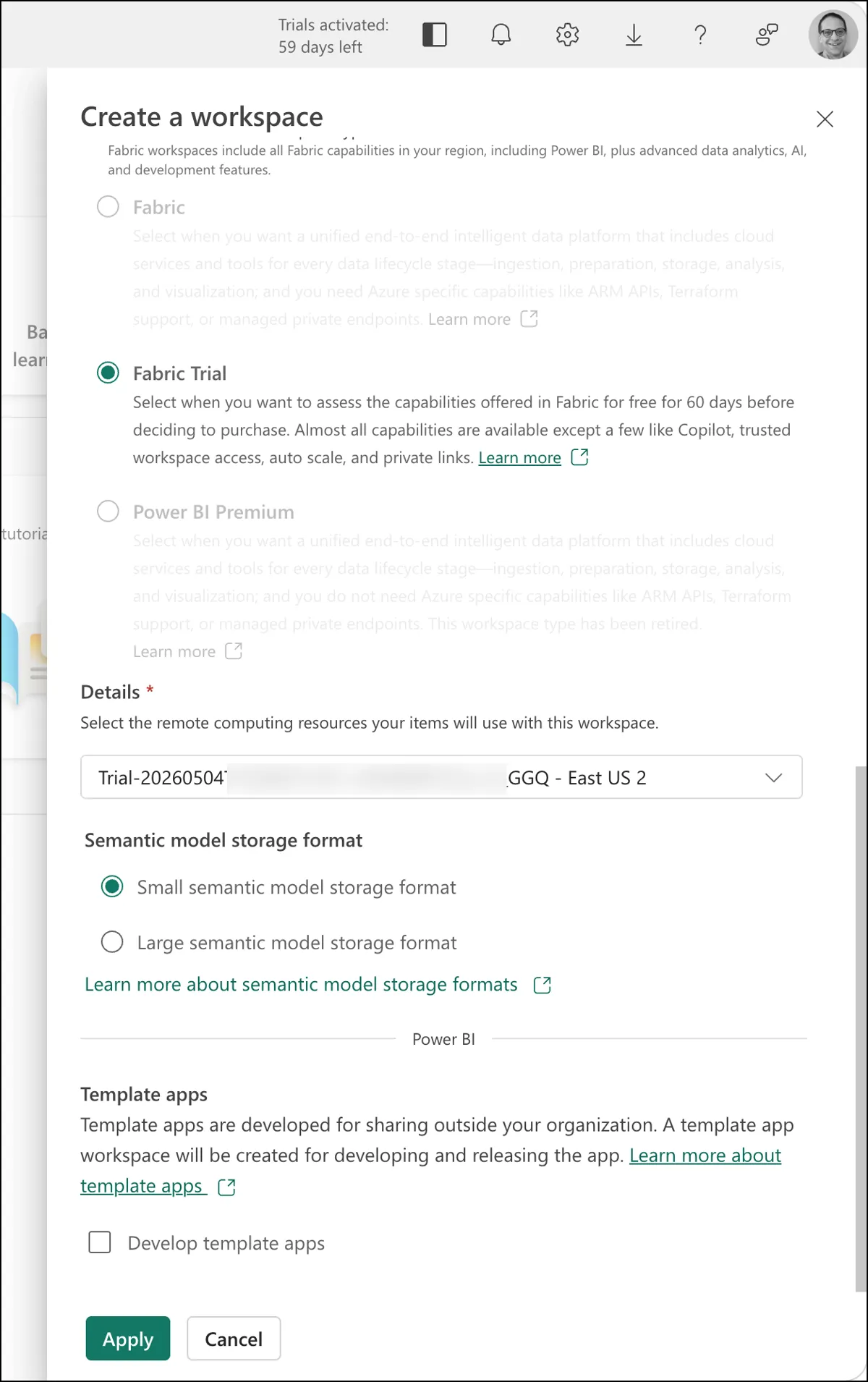
That should pop open the Create a workspace dialog. The one I created for the cocktail database app is called "DrinkDb".
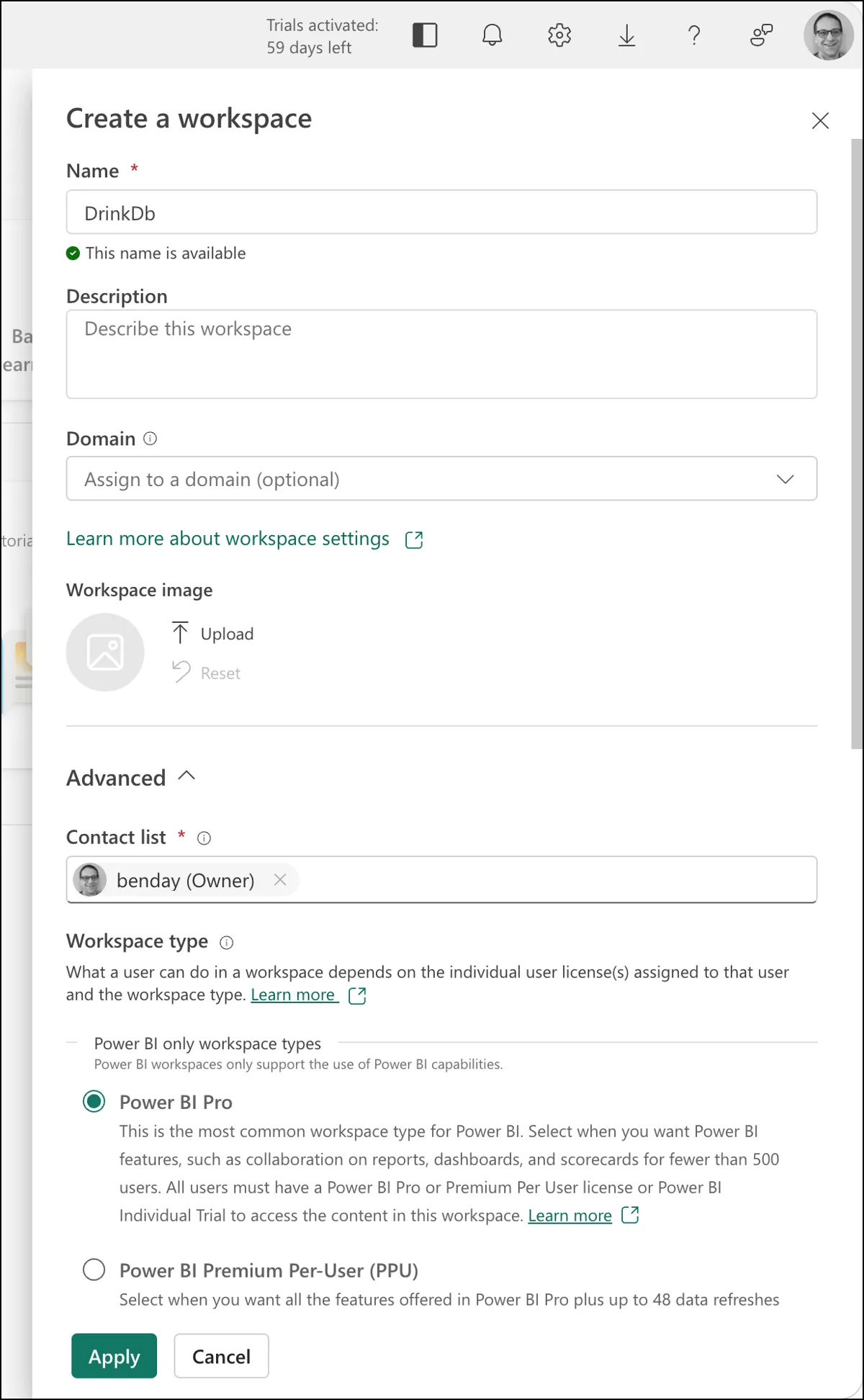
If you're planning to use the Fabric trial, be sure to scroll down on this dialog and choose Fabric Trial. Then you'll click the Apply button.
Create a Mirrored Azure Cosmos DB
After the workspace is created, you should see a screen that looks something like the following.
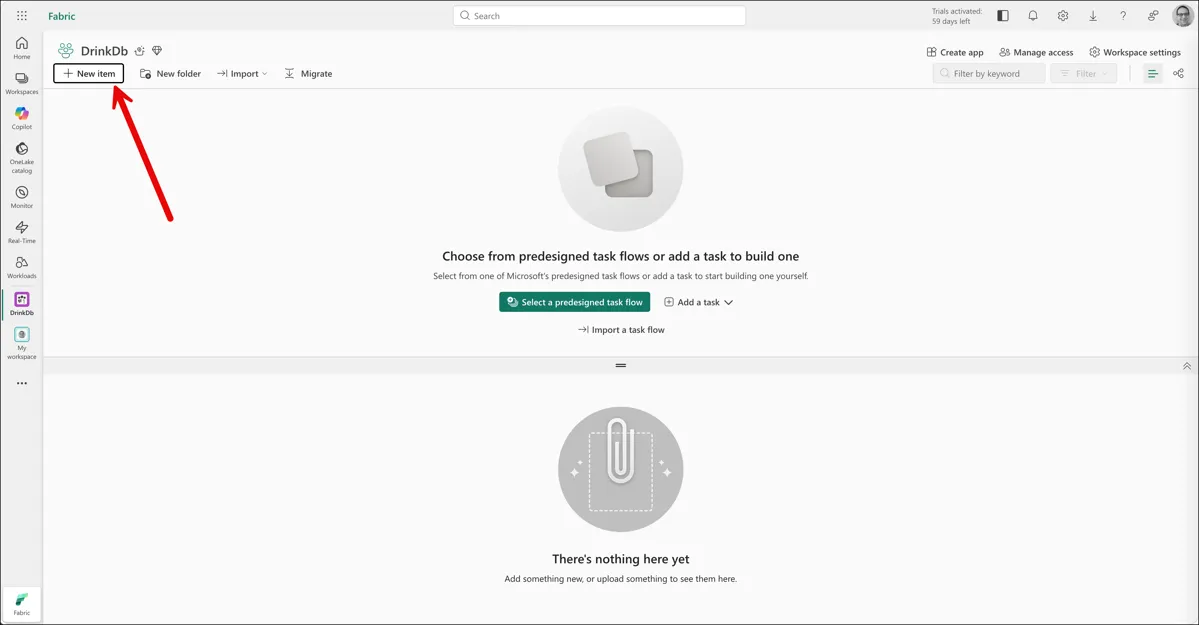
Next you'll need to create a new item in this workspace. Click the New Item button.
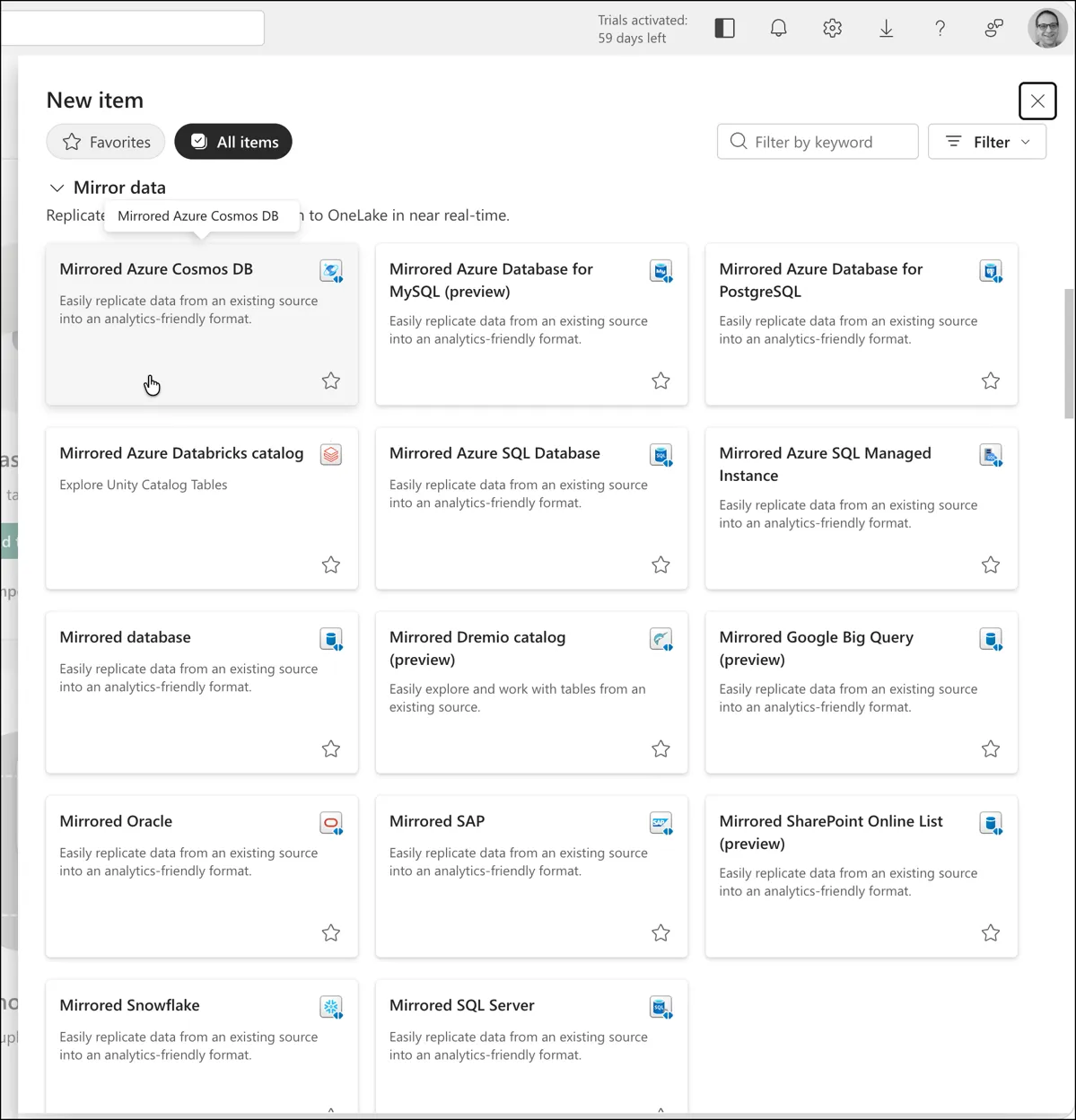
That'll pop up the New item dialog and one of the items you can pick is Mirrored Azure Cosmos DB.
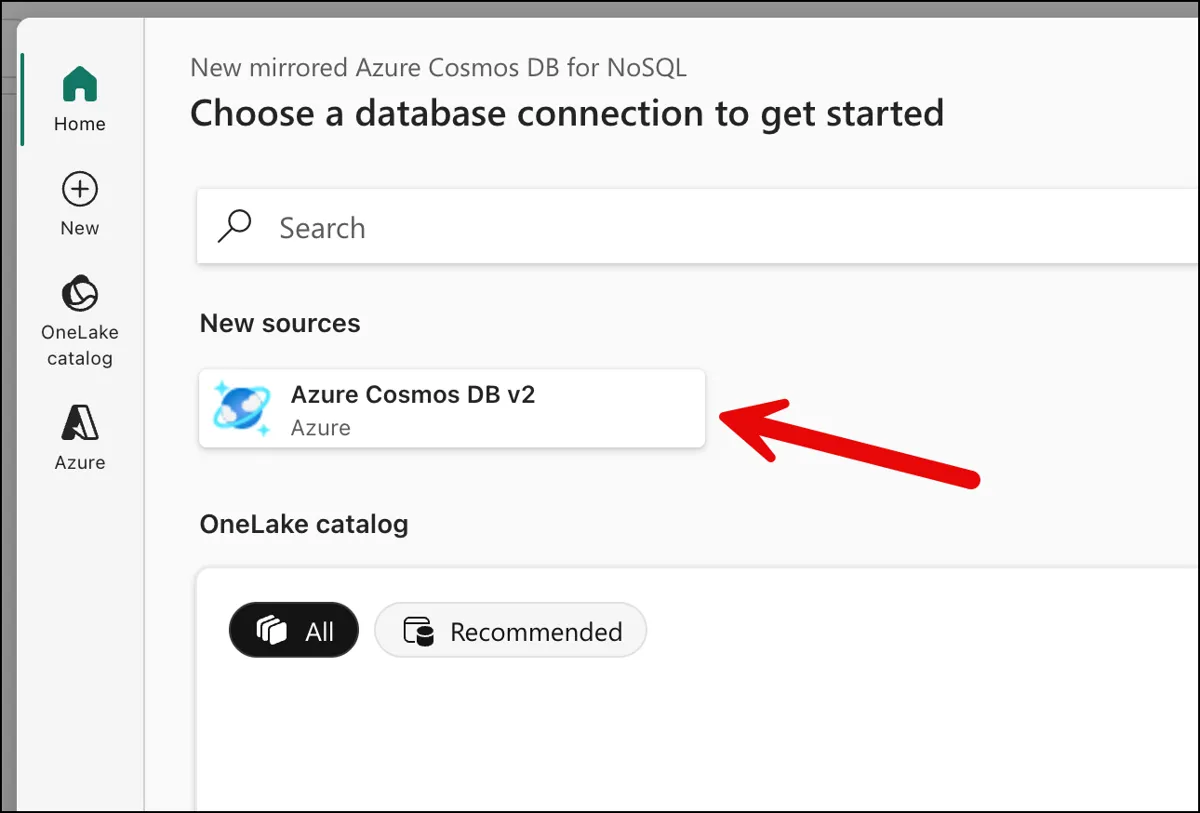
That'll show you the first page of the New mirrored Azure Cosmos DB for NoSQL flow. Under New sources click the Azure Cosmos DB v2 button.
Now you'll configure the Cosmos DB source. Provide your Cosmos DB endpoint URL and an account key. For the privacy level, select Organizational — this allows the data to be combined with other sources in your Fabric workspace, which you'll want if you ever extend your analytics beyond this single mirror. (If you prefer Entra ID authentication instead of account keys, that's supported too — but account keys are the simplest path for getting started.)
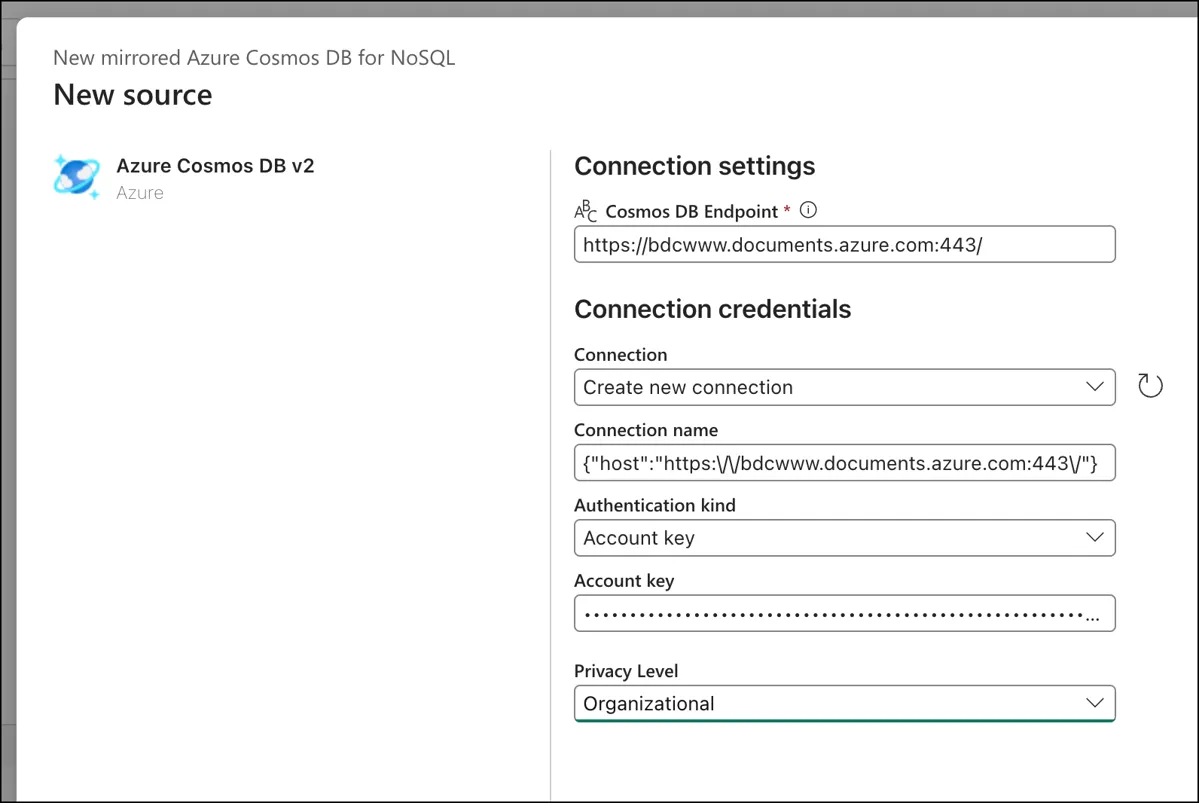
Click Connect, then select the database that contains your cocktail data. Then you'll see the Choose data page along with the list of containers in your database. Select the container(s) you want to mirror. In our case, that's the single container called cocktails with all our entity types — recipes, classifications, user favorites.
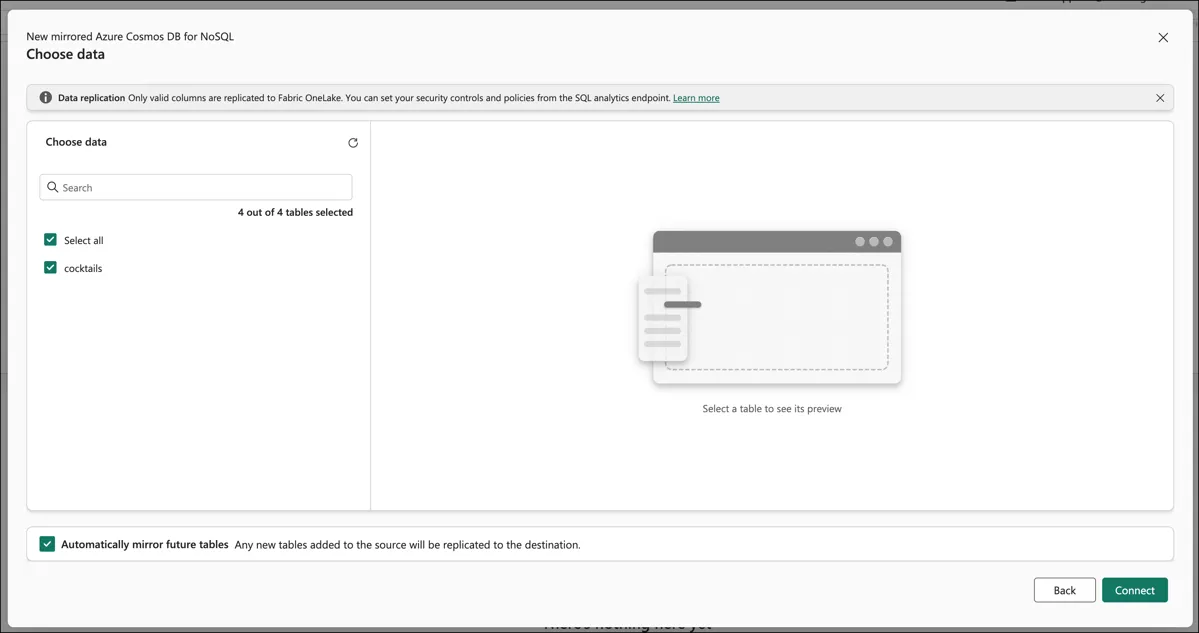
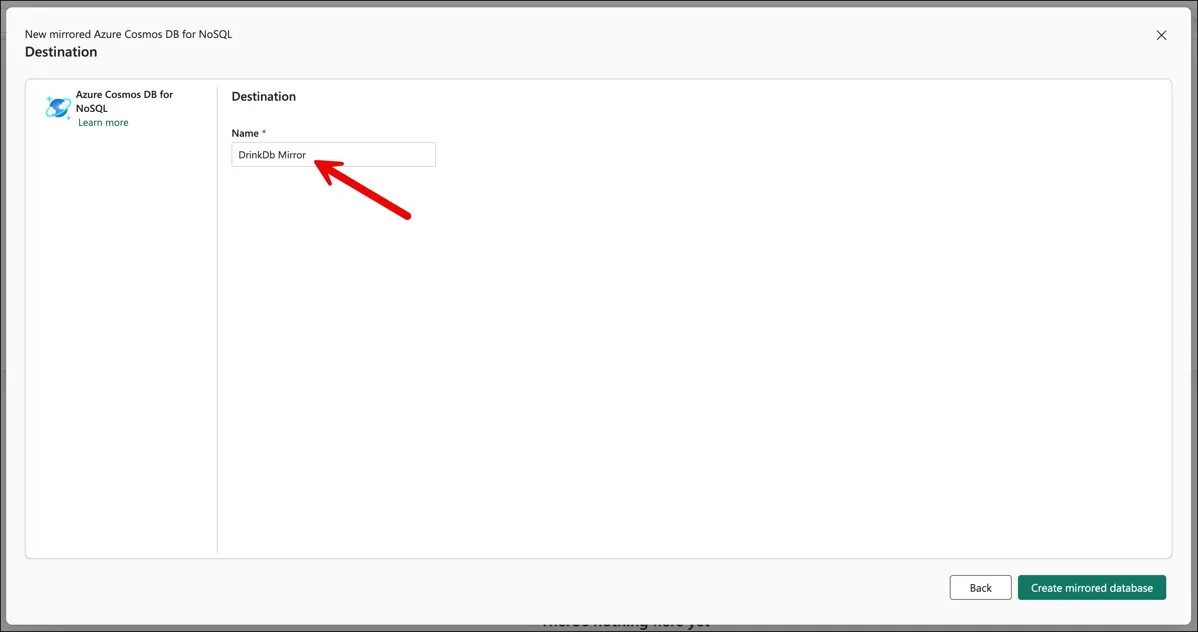
Click Connect on the Choose data page. You should now see the Destination page. I named the destination DrinkDb Mirror. Click the Create mirrored database button.
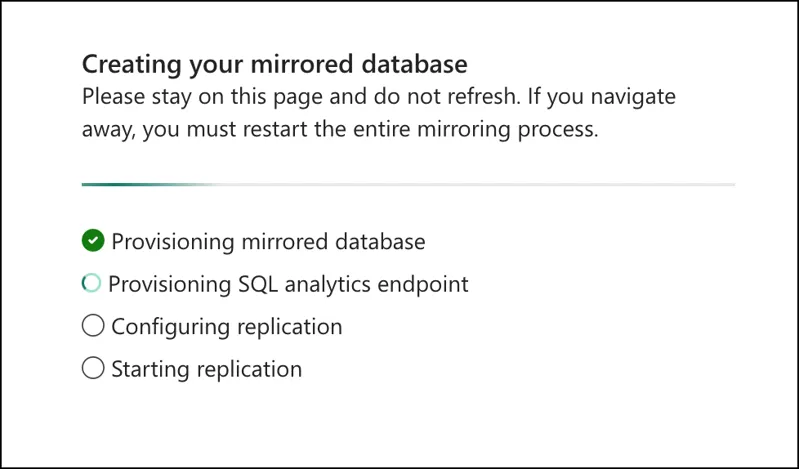
And that's just about it for the mirror creation. It should be started.
Monitoring the Replication
Then you wait. Two to five minutes for the initial sync.
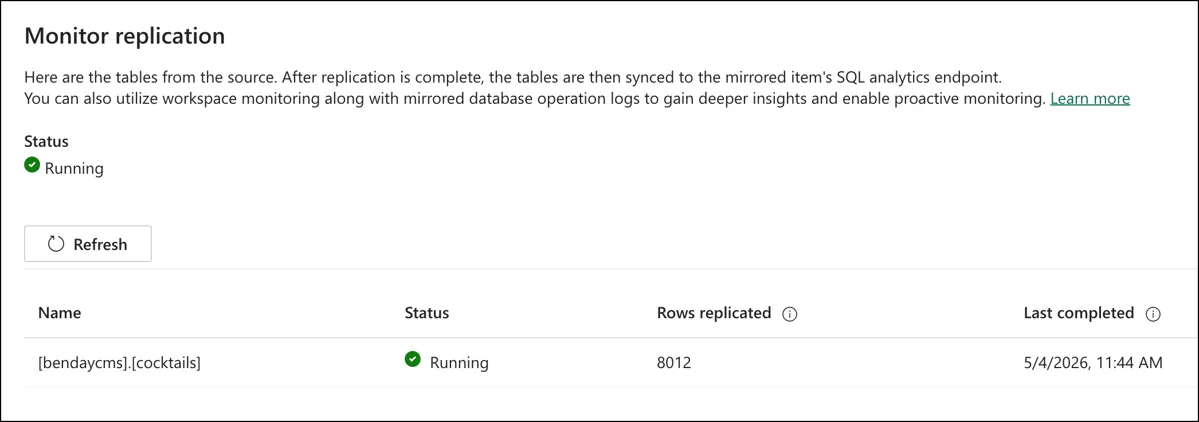
The Fabric portal shows a replication monitor with a status indicator and row counts. The status of "Running" was a tiny bit confusing to me initially. It means that the replication monitor is monitoring. The Rows replicated count and the Last completed date help you to understand what the current state of the replication is. When the status shows "Running" and the row counts show your data (in my case, 8,012 rows — that's the ~5,800 recipes plus ~2,144 ingredient classifications plus user favorites), you're done.
That's it. Zero lines of code. No pipeline. No configuration files. No Azure Functions. No scheduled jobs. Your cocktail data is now continuously replicated into an analytics-ready format, and it'll stay in sync as you add, modify, or delete documents in Cosmos.
How Fabric Flattens Your Documents
Before we start querying, it's worth understanding what Fabric did to your JSON documents during the mirroring. This will make the T-SQL syntax make a lot more sense.
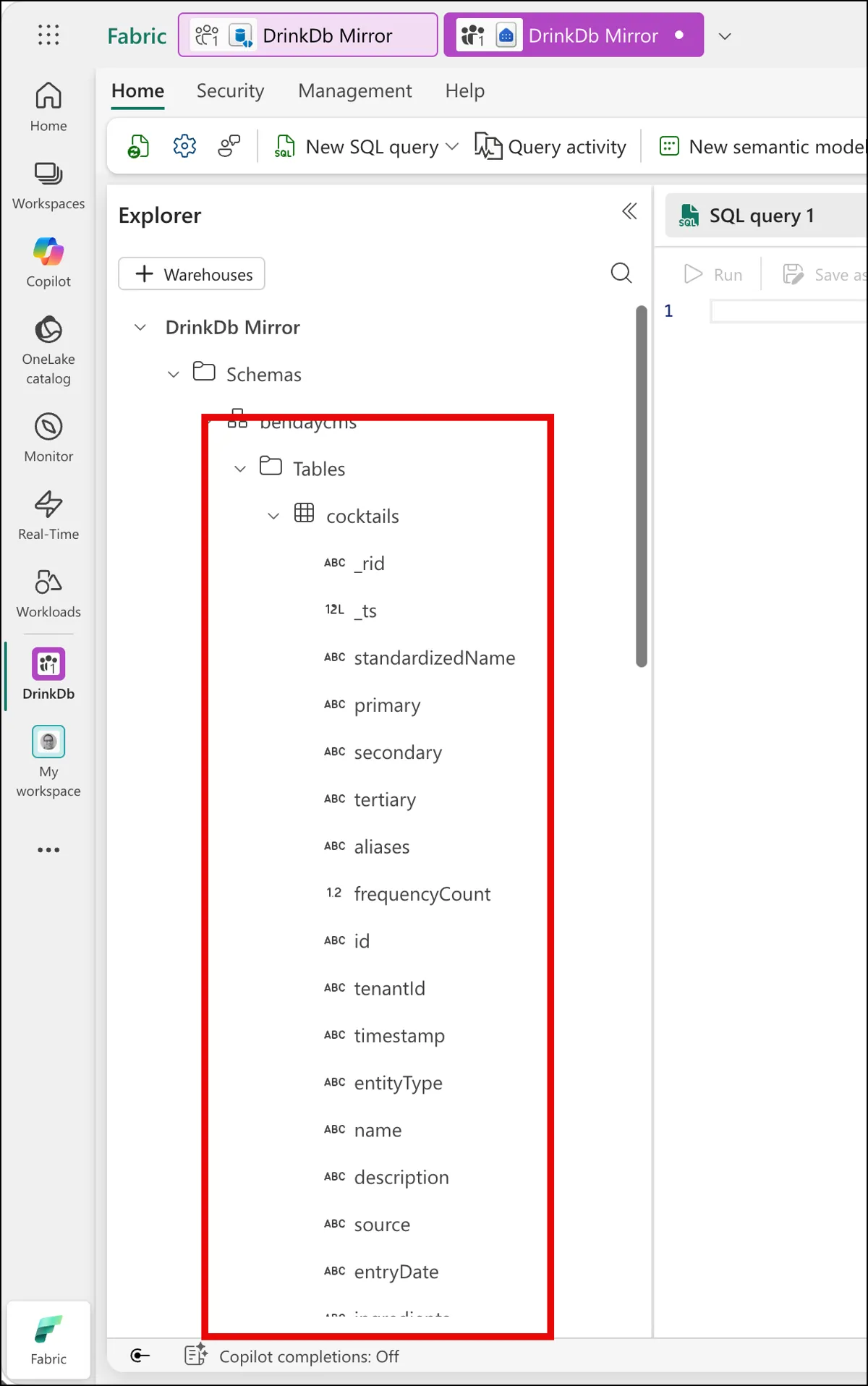
Fabric promoted every top-level property from your JSON documents into its own column on a single table. So entityType, tenantId, name, description, ingredients, primary, secondary, tertiary — they're all direct columns on the cocktails table. There's no wrapper object. There's no doc column that contains the whole JSON. It's flat.
The nested stuff — specifically the ingredients array inside each recipe — Fabric stores as a JSON string in a varchar column. It's the raw JSON array, but it's a string, not a structured type. To work with it, you'll use OPENJSON and CROSS APPLY to unpack it, and JSON_VALUE to extract specific properties from each element. If you've worked with JSON in SQL Server, you'll recognize the pattern. If you haven't, you'll pick it up from the examples below.
One other thing to notice: because all entity types live in the same Cosmos container, they all land in the same table. CocktailRecipe rows, IngredientClassification rows, UserFavorite rows — they're all in [bendaycms].[cocktails], distinguished by the entityType column. This means you'll filter by entityType in every query. It also means you can join across entity types — which, as we're about to see, is something Cosmos can't do.
Querying with T-SQL: The "Wait, I Can Do That?" Moment
This is where it gets fun...and familiar. (Funmiliar?)
In the Fabric portal, click Query in T-SQL from the mirrored database view. This opens the SQL analytics endpoint. Each Cosmos container appears as a table, and you can write T-SQL against it.
Let me show you some queries that would be painful or impossible directly against Cosmos.
Query 1: Most Popular Ingredient Categories
"What are the most common ingredient categories across all recipes?"
In Cosmos, this query scans every document in the ["COCKTAILS", "CocktailRecipe"] partition and charges RUs proportional to all the data touched. Do it once, and it's fine. Put it behind a dashboard that refreshes automatically, and you're paying transactional prices for analytical work, repeatedly.
In the SQL analytics endpoint:
SELECT TOP 20
    JSON_VALUE(i.value, '$.primary') AS primary_spirit,
    COUNT(DISTINCT c.id) AS recipe_count,
    AVG(ingredient_counts.cnt) AS avg_ingredients
FROM [bendaycms].[cocktails] c
CROSS APPLY OPENJSON(c.ingredients) AS i
JOIN (
    SELECT id, COUNT(*) AS cnt
    FROM [bendaycms].[cocktails]
    CROSS APPLY OPENJSON(ingredients)
    WHERE entityType = 'CocktailRecipe'
    GROUP BY id
) ingredient_counts ON c.id = ingredient_counts.id
WHERE c.entityType = 'CocktailRecipe'
  AND JSON_VALUE(i.value, '$.primary') IS NOT NULL
GROUP BY JSON_VALUE(i.value, '$.primary')
ORDER BY recipe_count DESC
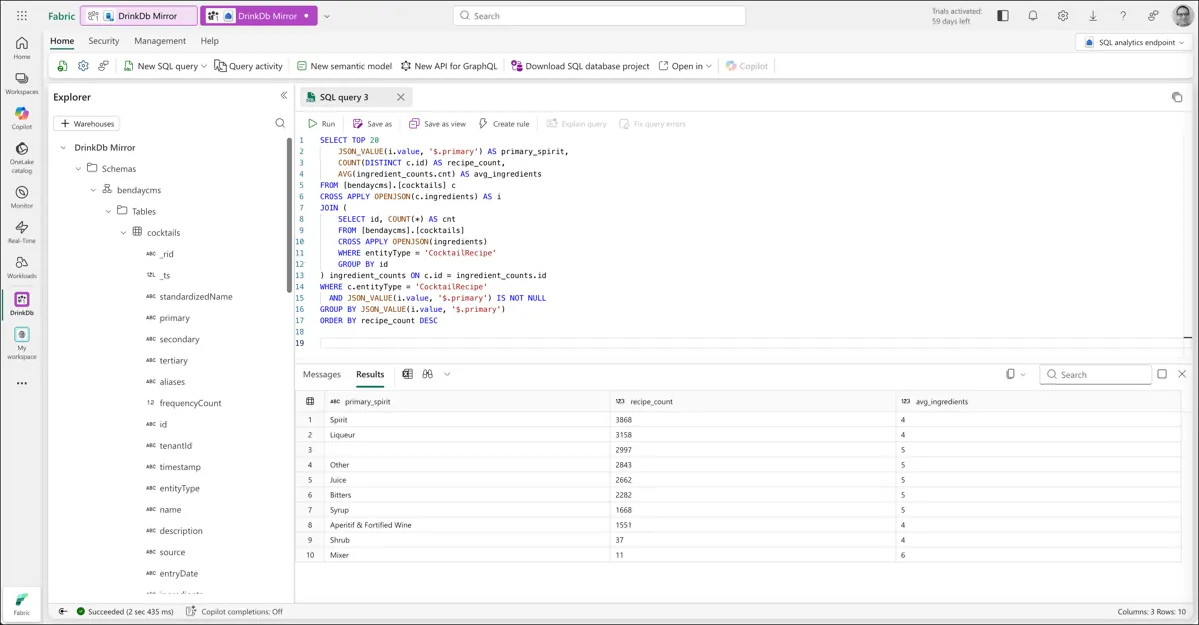
No RU cost on Cosmos. The query runs entirely in Fabric's compute. And you can run it as many times as you want — there's no meter ticking on your transactional database.
A few things jump out from the results. "Spirit" leads at 3,868 recipes, which makes sense — it's the broadest primary classification. "Liqueur" at 3,158 is a close second. And there's a row with a blank primary value and 2,997 recipes — ingredients where the primary classification was never set. Within five minutes of querying our data analytically, we've already found a data quality issue we didn't know about. That, by itself, is a pretty good argument for having an analytical layer on top of your operational data.
The average ingredients column shows 4-6 across the board, which feels right for cocktail recipes. Simpler drinks (Spirits) average around 4 ingredients; recipes using Bitters or Syrups tend to have 5 — probably because they're being added as modifiers to more complex drinks.
Query 2: Ingredient Co-occurrence — What Goes With What?
"Which ingredients appear together most often?"
This is the killer query. It requires comparing every ingredient in a recipe against every other ingredient in the same recipe, across all 5,800+ recipes. That's a self-join on a nested array. Cosmos DB cannot do joins. This query is structurally impossible in Cosmos.
SELECT TOP 20
    JSON_VALUE(i1.value, '$.standardizedName') AS ingredient_1,
    JSON_VALUE(i2.value, '$.standardizedName') AS ingredient_2,
    COUNT(*) AS co_occurrence_count
FROM [bendaycms].[cocktails] c
CROSS APPLY OPENJSON(c.ingredients) AS i1
CROSS APPLY OPENJSON(c.ingredients) AS i2
WHERE c.entityType = 'CocktailRecipe'
  AND JSON_VALUE(i1.value, '$.standardizedName') < JSON_VALUE(i2.value, '$.standardizedName')
  AND JSON_VALUE(i1.value, '$.standardizedName') IS NOT NULL
  AND JSON_VALUE(i2.value, '$.standardizedName') IS NOT NULL
  AND JSON_VALUE(i1.value, '$.standardizedName') <> ''
  AND JSON_VALUE(i2.value, '$.standardizedName') <> ''
GROUP BY JSON_VALUE(i1.value, '$.standardizedName'), JSON_VALUE(i2.value, '$.standardizedName')
ORDER BY co_occurrence_count DESC
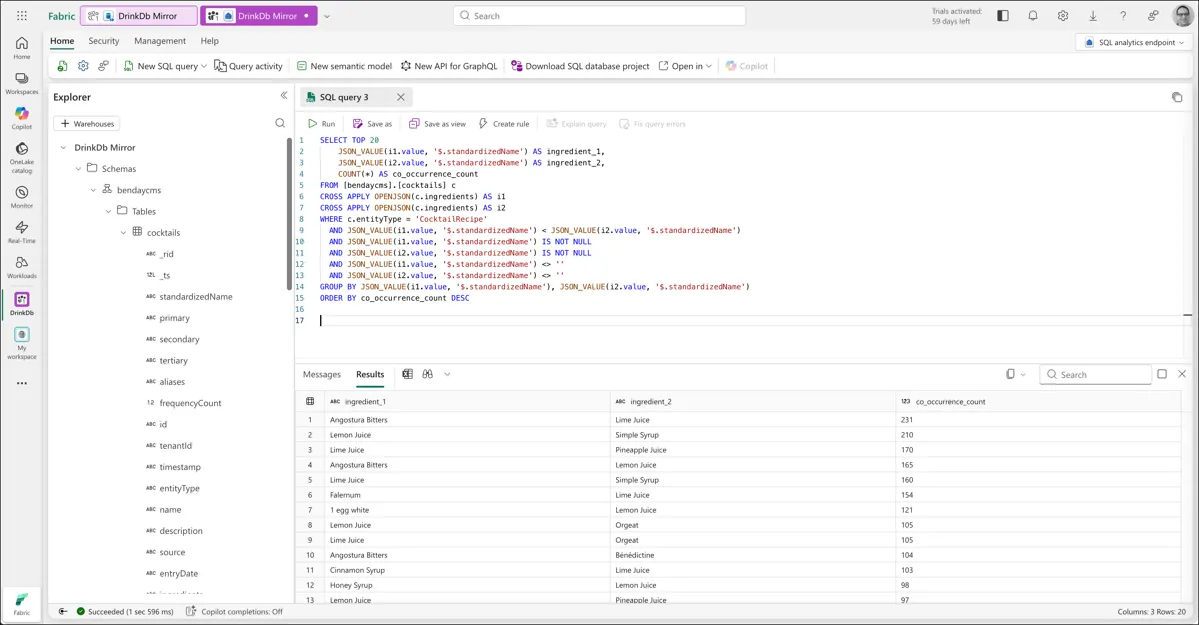
The < comparison prevents duplicates — "Lemon Juice + Simple Syrup" and "Simple Syrup + Lemon Juice" are the same pairing, so we only count it once. The IS NOT NULL and <> '' filters exclude ingredients with missing standardized names.
The results are interesting. The most common pairings are modifiers, not base spirits — Angostura Bitters with Lime Juice (231 recipes), Lemon Juice with Simple Syrup (210), Lime Juice with Pineapple Juice (170). That tells you something about how cocktails are actually constructed: the base spirit varies, but the supporting cast is remarkably consistent. That's a genuine analytical insight you'd never get from Cosmos directly.
Query 2b: Spirit Pairings Specifically
We can refine the co-occurrence query to look specifically at which base spirits get combined:
SELECT TOP 20
    JSON_VALUE(i1.value, '$.standardizedName') AS spirit_1,
    JSON_VALUE(i2.value, '$.standardizedName') AS spirit_2,
    COUNT(*) AS co_occurrence_count
FROM [bendaycms].[cocktails] c
CROSS APPLY OPENJSON(c.ingredients) AS i1
CROSS APPLY OPENJSON(c.ingredients) AS i2
WHERE c.entityType = 'CocktailRecipe'
  AND JSON_VALUE(i1.value, '$.primary') = 'Spirit'
  AND JSON_VALUE(i2.value, '$.primary') = 'Spirit'
  AND JSON_VALUE(i1.value, '$.standardizedName') < JSON_VALUE(i2.value, '$.standardizedName')
  AND JSON_VALUE(i1.value, '$.standardizedName') <> ''
  AND JSON_VALUE(i2.value, '$.standardizedName') <> ''
GROUP BY JSON_VALUE(i1.value, '$.standardizedName'), JSON_VALUE(i2.value, '$.standardizedName')
ORDER BY co_occurrence_count DESC
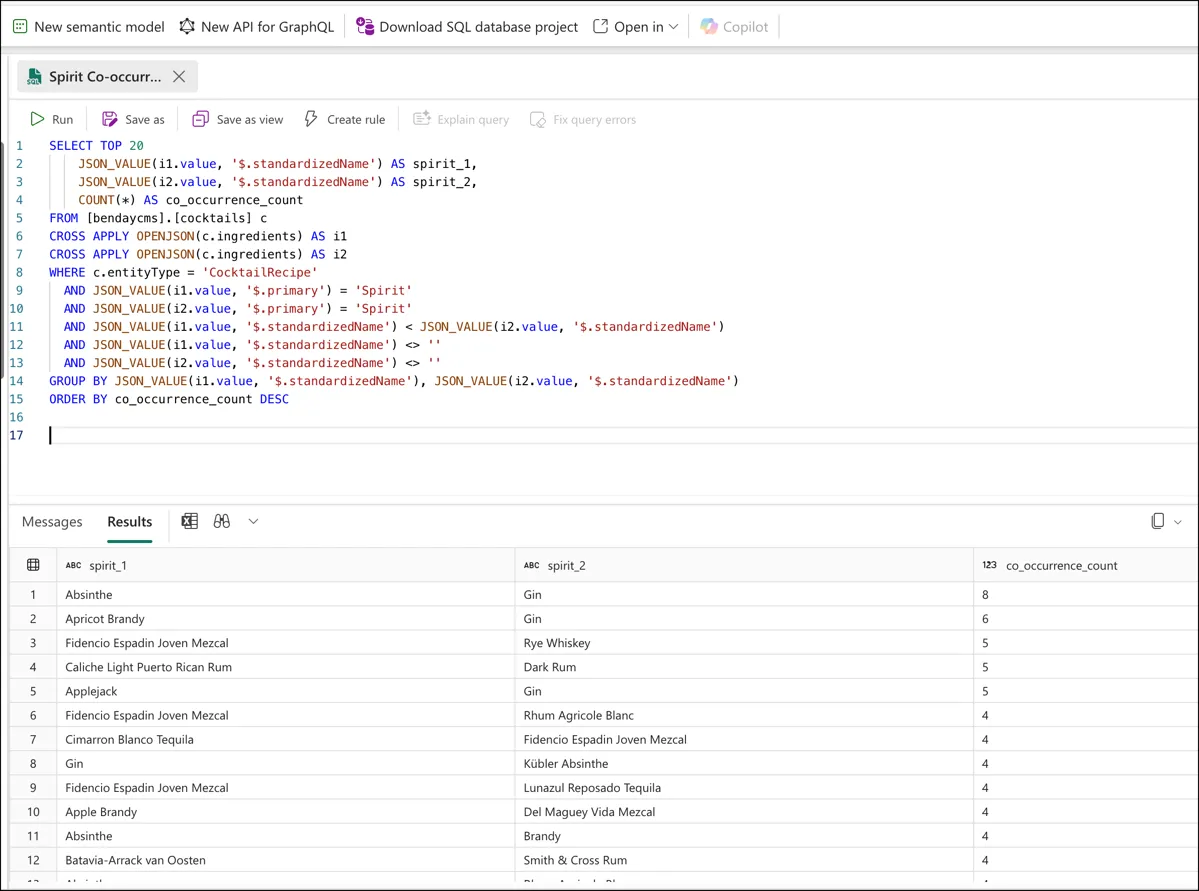
The counts here are lower — which itself is an insight. Most cocktails have a single base spirit. Multi-spirit recipes (like a Vieux Carré or a Long Island Iced Tea) are relatively uncommon. I expected stronger pairing signals and instead learned something about the structure of the dataset. Five minutes of ad hoc querying and I'm already learning things about my own data that I didn't know.
Notice what we just did: we went from "structurally impossible in Cosmos" to "let me refine my analysis with a WHERE clause" with about 10 minutes of setup. That's the power of having set operations next to the data.
Query 3: Cross-Entity Join — Recipes Per Classification
"How many recipes use each ingredient classification?"
This query joins recipe data with classification data. In Cosmos, these are different entity types in the same container — CocktailRecipe and IngredientClassification. Cosmos stores them side by side but can't join across them. In the SQL analytics endpoint, they're all rows in the same table, and T-SQL joins work naturally.
SELECT TOP 30
    ic.[primary] AS category,
    ic.secondary AS subcategory,
    COUNT(DISTINCT c.id) AS recipe_count
FROM [bendaycms].[cocktails] c
CROSS APPLY OPENJSON(c.ingredients) AS i
JOIN [bendaycms].[cocktails] ic
    ON ic.entityType = 'IngredientClassification'
    AND ic.secondary = JSON_VALUE(i.value, '$.secondary')
WHERE c.entityType = 'CocktailRecipe'
  AND JSON_VALUE(i.value, '$.secondary') IS NOT NULL
  AND JSON_VALUE(i.value, '$.secondary') <> ''
GROUP BY ic.[primary], ic.secondary
ORDER BY recipe_count DESC
Amaro leads at 1,524 recipes — which surprised me. Rum, Vermouth, Whiskey, and Gin round out the top five. The category/subcategory breakdown gives you a genuine picture of the collection's composition, and it came from a cross-entity join that is completely impossible in Cosmos. Two different entity types, same container, joined on a shared property, results in 1.5 seconds.
Query 4: Ad Hoc Exploration
Here's the scenario that matters most in real life. A product manager walks over (or Slacks you or hits you up on Teams, because who walks anywhere anymore) and says: "Hey, can you show me all the gin recipes that have exactly three ingredients? I'm curious what the simplest gin cocktails look like."
Nobody designed for this query. Nobody anticipated it. In Cosmos, you'd need to write a new C# query method, test it, deploy it, and expose it through some UI or API. In the SQL analytics endpoint:
SELECT c.name, c.description
FROM [bendaycms].[cocktails] c
CROSS APPLY OPENJSON(c.ingredients) AS i
WHERE c.entityType = 'CocktailRecipe'
  AND JSON_VALUE(i.value, '$.standardizedName') = 'Gin'
GROUP BY c.id, c.name, c.description
HAVING (
    SELECT COUNT(*)
    FROM OPENJSON(c.ingredients)
) = 3
ORDER BY c.name
It's the kind of question people ask when they can see their data and start getting curious. That ad hoc explorability is the superpower of set-based analytics — and it's the thing Cosmos architecturally can't provide.
These queries aren't exotic. They're the kind of things any product team asks eventually. The point isn't that Fabric is magic — it's that set-based analytical queries belong in a set-based analytical engine. The right tool for the job.
What About Power BI?
From the SQL analytics endpoint, you can build Power BI reports using DirectLake mode — the reports read directly from the mirrored data in OneLake with no import step, no scheduled refresh, and no intermediate copy. When the underlying Cosmos data changes, the mirror syncs, and the report reflects the change.
I'm not going to walk through the Power BI stuff because this is a Cosmos DB book. But the path from "working T-SQL queries" to "interactive dashboard" is straightforward and covered in Microsoft's Fabric mirroring tutorial. Get that SQL analytics endpoint working and those T-SQL queries and you're most of the way there.
What It Costs
I want to be honest about cost because cost is a real concern and hand-waving doesn't help anybody.
Mirroring compute — the replication from Cosmos to OneLake — is free. Microsoft doesn't charge for the Fabric compute that keeps your mirror in sync.
Mirroring storage — the data stored in OneLake — is free up to a limit based on your Fabric capacity SKU. For the trial capacity (F64), that limit is 64 TB. The cocktail app's data is roughly 12 MB. We're not going to hit that limit.
Cosmos continuous backup — which is a prerequisite for mirroring — is free at the 7-day retention tier. If you want 30-day retention, that has a cost, but it's a Cosmos cost, not a Fabric cost.
T-SQL query compute — running queries in the SQL analytics endpoint — is charged at regular Fabric capacity rates. During the 60-day trial, this is included.
The comparison: Running analytical queries directly against Cosmos costs RUs every time. Building an ETL pipeline to SQL Server costs developer time to build, developer time to maintain, Azure SQL pricing for the database, and the permanent operational burden of keeping the pipeline working. Fabric mirroring costs essentially nothing for the replication, and Fabric compute for the queries you run. For a dataset at our scale, the cost is negligible. For larger datasets, the math gets more favorable — because the alternative (reading everything into app memory, or maintaining an ETL pipeline) gets proportionally more expensive while mirroring stays cheap.
The Closing Argument
Chapter 1 started with the observation that relational databases exist because storage cost $700,000 per gigabyte in 1970. Normalization was an economic necessity. The impedance mismatch — chopping trees into boxes — was the price of affordable storage.
Thirteen chapters later, we've built applications where domain objects serialize to JSON and get stored directly. No adapter layers. No entity configuration files. No migration scripts. The tree goes in, the tree comes out. You've added AI-powered vector search to a working cocktail app for about a penny. You've instrumented your queries so you know exactly what runs and what it costs. You've designed a multi-entity, multi-tenant application with three entity types in one container and zero cross-partition queries.
All of that — all thirteen chapters of it — would have been thrown away the moment someone said "I need a report" and you decided to retreat to SQL Server. The reporting gap was the last legitimate objection to Cosmos DB for the kinds of applications this book is about. And the answer turned out not to be "go back to relational" but "add a purpose-built analytical layer that maintains itself."
Remember the Acute/Chronic Tradeoff Test from the last chapter. It works here — Fabric is the targeted solution that solves the acute pain without adopting the chronic cost. But it works beyond here too. Whenever you feel the pull of a sharp, visible limitation driving a big architectural decision, slow down. Name the chronic cost of the alternative. Check whether a targeted solution exists. Check whether you're overweighting the loss.
Relational databases are great technology — for the things they're great at. Cosmos DB is great technology — for the things it's great at. The mature architectural position isn't "pick one." It's: use the right tool for the job, and understand that the right tool for transactions and the right tool for analytics don't have to be the same system.
They just have to be connected. And it turns out, connecting them takes about five clicks and zero lines of code.
This is the final numbered chapter of Azure Cosmos DB for .NET Developers. The book continues with Appendix A: Cosmos DB Query Cookbook and Appendix B: Cosmos DB Operations Reference.